
If you want a camera creators *actually love using*, I’d keep it simple. I’ve shot with these in real life. They feel fast in the hand and ready the second inspiration hits.
DJI Osmo Pocket 3 shines for smooth 4K video. The gimbal glides like butter. You hear less shake and see cleaner motion.
Canon EOS R50 bundle gives you an easy all in one setup. The grip feels secure and the menus stay friendly.
It’s a great pick if you want sharp video and room to grow.
Sony ZV 1F works great for vlogging. Autofocus locks on fast. Your face stays crisp while city noise and busy streets fade into the background.
Want something small and easy to carry? Pocket size 4K cameras punch above their weight. They slip into a jacket pocket and feel light as a feather.
Keep reading. I’ll help you pick the best camera for your style and shooting routine.
DJI Osmo Pocket 3 Creator Combo, Vlogging Camera with 1” CMOS & 4K/120fps
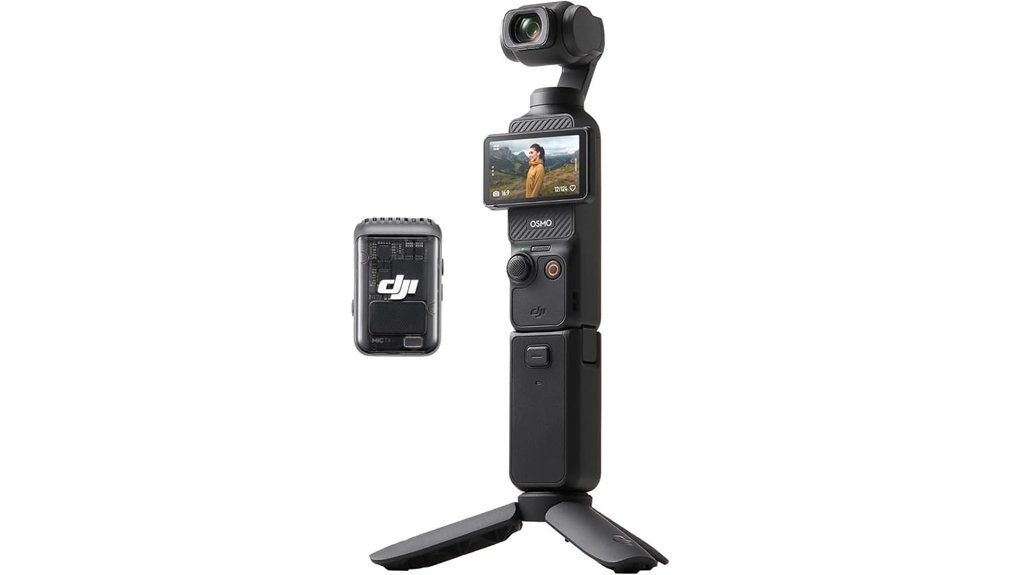
If you want a vlogging camera that slips into your pocket and still shoots *silky* video, I’d grab the DJI Osmo Pocket 3 Creator Combo first. I’ve used it on walks, in airports, and in crowded streets. It feels smooth in the hand and the gimbal moves with a soft mechanical glide. Like a tiny steadicam with manners.
You get a 1 inch CMOS sensor for cleaner detail and better low light. You also get 4K at 120fps for crisp slow motion that looks rich and fluid. The 3 axis gimbal keeps your footage steady while you walk, talk, or turn fast.
The 2 inch rotating touchscreen makes vertical and horizontal shooting quick. Tap, flip, record. Done. ActiveTrack 6.0 locks on fast and follows you like a loyal puppy. I found it especially handy for solo filming.
Audio is a strong point too. You can record stereo sound right from the camera. You can also pair DJI Mic 2 transmitters through OsmoAudio for cleaner voice capture. Voices sound close and clear, and the result feels more polished right away.
At 179 grams it’s easy to carry all day. The Creator Combo adds smart extras that save time in the field.
What you get in the Creator Combo
- DJI Osmo Pocket 3
- Battery handle
- Mini tripod
- DJI Mic 2 transmitter
- Fast charging support
Best For: Vloggers, travel creators, and content makers who want stabilized 4K video, sharp subject tracking, and easy shooting for TikTok, YouTube Shorts, and YouTube vlogs.
Pros:
- 1 inch CMOS sensor, 4K 120fps, and 10 bit D Log M give you rich video with more room for color grading.
- 3 axis mechanical gimbal keeps motion smooth and natural. Footage feels steady even during walking shots.
- ActiveTrack 6.0 helps you stay framed during solo shoots. That’s worth its weight in gold.
- Creator Combo accessories add real value for travel video and daily vlogging.
Cons:
- 9.4 MP photos suit casual stills best, while video stays the clear star.
- microSD storage means you’ll want a card ready before your first shoot.
- OsmoAudio and DJI Mic support shine brightest if you already use DJI gear.
If your main goal is portable vlogging with cinematic stabilization, this camera punches above its weight. I think it’s one of the easiest tools you can use to film sharp, smooth content without lugging around a bigger setup.
Canon EOS R50 Content Creator Bundle Camera
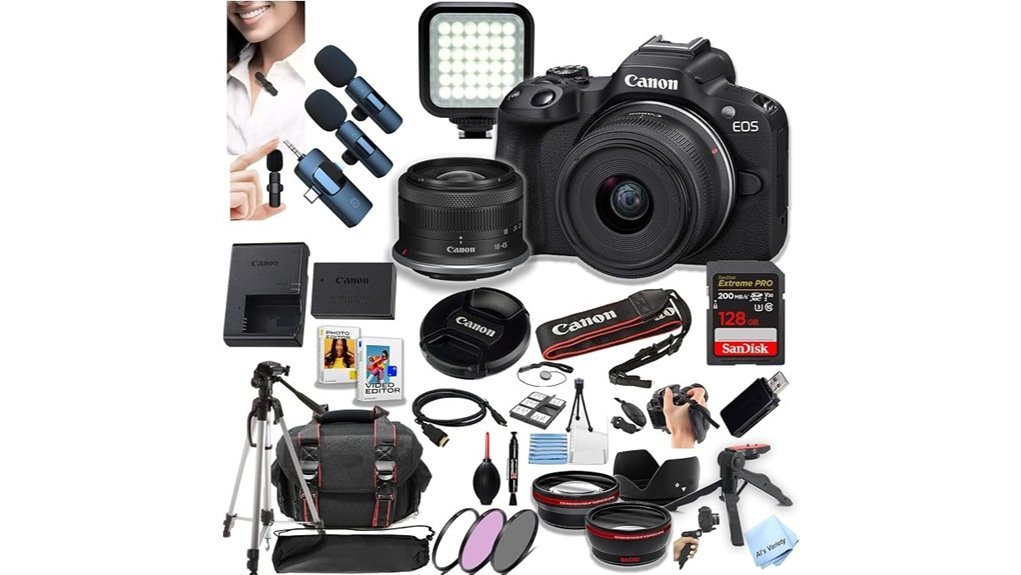
Canon’s EOS R50 Content Creator Bundle feels like a smart first step for creators who want to hit record fast. I’ve used kits like this in real shooting days and this one covers the basics without the usual scramble. It’s *ready out of the box*. Easy as pie.
You get the Canon EOS R50 mirrorless camera and the RF S 18 to 45mm lens. The body feels light in your hands and the grip sits snug in your palm. The shutter has that crisp little click Canon fans love. You can shoot photos and video right away.
The SanDisk 128GB Extreme PRO SD card adds fast storage for 4K clips and stills. That matters when you’re filming vlogs or short form content. I like seeing a trusted card in the box because storage headaches smell like burnt toast.
Audio gets a real boost here. The dual wireless microphones help your voice sound clearer and fuller. Voices come through with less room echo and less fuss. For interviews or two person videos this is a handy win. Two birds with one stone.
The extra gear helps on day one.
- 50 inch tripod
- LED video light
- Filters
- Tulip lens hood
- HDMI cable
- Gadget bag
- Lens cap keeper
- Cleaning cloth
- Bundled software and tools
The tripod sets up fast and the light adds a cleaner look indoors. The hood cuts glare in bright sun. The cloth feels soft on the lens glass and that small detail counts. Little things carry the day.
Best For: *New content creators* who want a Canon mirrorless camera bundle with video tools audio gear lighting and storage in one box.
Pros:
- Complete starter kit with camera lens SD card mics light tripod and bag.
- Dual wireless mics help with vlogs interviews and YouTube videos.
- Useful extras make filming transfers and setup feel smoother.
Cons:
- The 18 to 45mm kit lens suits everyday use and many creators may want a faster lens later for blurrier backgrounds and dim rooms.
- The bundle accessories feel practical for starters and some users may upgrade piece by piece over time.
- The 50 inch tripod works for basic setups and taller creators may want more height and heft.
If you want an all in one camera bundle for content creation this kit makes a strong case. You open the box and start creating. That’s the whole ball game.
Sony ZV-1F Content Creator Ultimate Kit Bundle
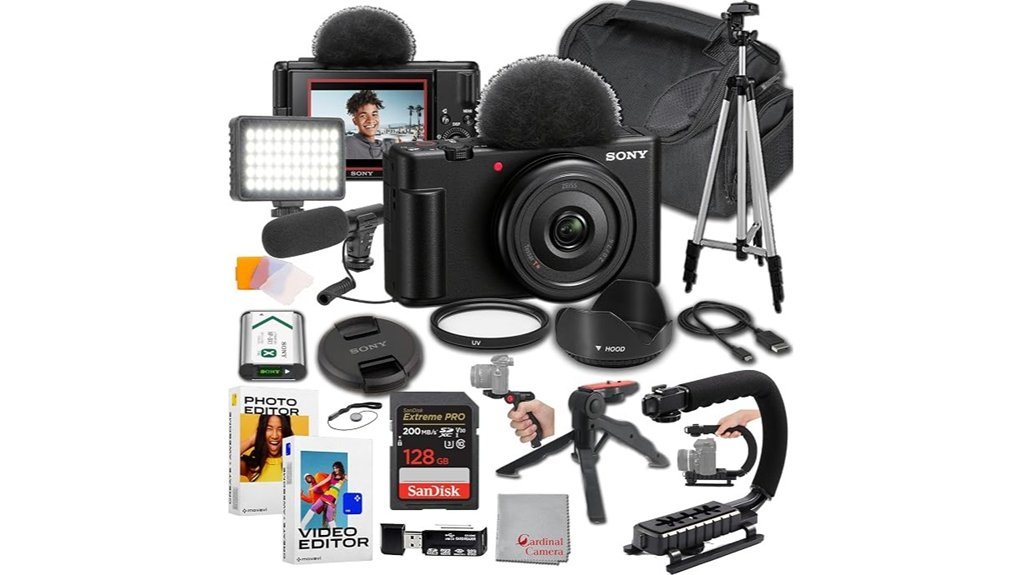
Sony’s ZV-1F Content Creator Ultimate Kit Bundle feels made for creators who want to hit record and go. I’ve used kits like this on busy streets and in hotel rooms. It slips into a bag like a fish in water.
You get 4K video that looks clean and bright. Photos come out sharp with lively color. Real time Eye Autofocus locks on fast so your face stays crisp while you talk. Intelligent Auto keeps things easy when you want speed over settings.
For vlogging this camera shines. Product Showcase snaps focus from your face to an item in your hand. *Background Defocus* gives you that soft blur look with one button. Active Mode smooths handheld clips so your footage feels steadier in motion.
Sound matters. This kit starts strong with clear built in audio. The added condenser mic captures voices with more body and less room echo. You hear the difference right away. It’s the cherry on top.
The extras add real value.
- 128GB SanDisk Extreme Pro card
- U grip
- Tripod
- UV filter
- Movavi editing software
- Integrated flash
- Lightweight camera body
In hand the camera feels light and smooth. The grip has a nice texture and the buttons click with a clean little snap. The whole setup stays travel friendly and easy to pack.
Best For: Beginner vloggers. Travel creators. Content makers who want a compact all in one kit with simple tools and helpful extras right out of the box.
Pros:
- Shoots crisp 4K video and sharp photos with fast Eye Autofocus for easy results.
- Gives you creator tools like Product Showcase, *Background Defocus*, and Active Mode for polished handheld content.
- Packs in useful extras like a condenser mic, memory card, tripod, grip, UV filter, and editing software.
Cons:
- Best fits creators who enjoy a simple setup and quick workflow.
- Active Mode works well for casual movement and walking clips.
- The bundle includes a wide mix of accessories for different shooting styles.
4K Vlogging Camera, Pocket Digital Camera, 330° Rotating Lens
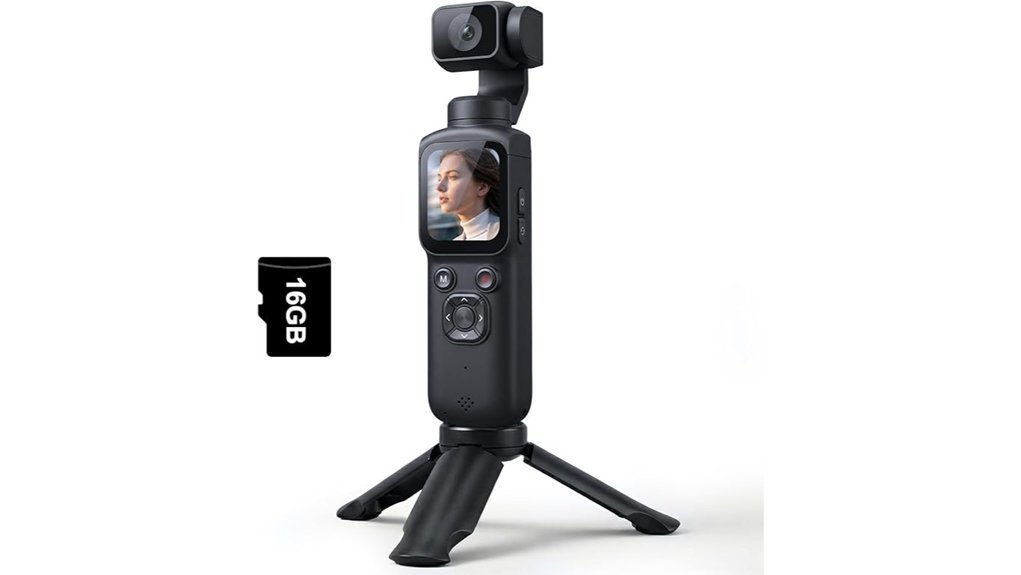
This 4K pocket vlogging camera feels made for quick shoots and fast posts. I’ve used cameras like this on walks and weekend trips, and this one slips into your hand like a bar of soap. Small body. Big reach. That’s the trick up its sleeve.
You get 4K video, 75MP photos, *fast autofocus*, and a wide angle lens. Your footage looks crisp in daylight and clean for casual travel vlogs. The shutter click sounds light and snappy, which gives the camera a fun point and shoot feel.
The 330° rotating lens makes self framing simple. I like this most for solo creators because you can flip the lens and check your angle in seconds. It’s like having a tiny camera buddy in your pocket. Quick. Easy. Done.
Built in WiFi helps you move clips to your phone fast. That matters when you want to trim a video and post before the moment goes cold. You also get time lapse, slow motion, and interval shooting, so your content has more variety without extra fuss.
The included kit adds real value right out of the box.
In the box:
- 16GB TF card
- Mini tripod
- Wrist strap
- Charging cable
- Travel bag
Best For: *Beginner vloggers*, travelers, and social media creators who want a compact 4K vlogging camera with easy self recording and quick wireless sharing. If you shoot YouTube Shorts or TikTok clips, this camera fits like a glove.
Why I’d recommend it:
- Compact and lightweight, easy to carry for daily use or travel
- 4K video and 75MP photos, strong for casual content creation
- 330° rotating lens, great for selfies and solo vlogging
- Fast autofocus and wide angle lens, helpful for sharp clips and wider scenes
- Built in WiFi, handy for phone transfer and fast posting
- Starter kit included, useful for first time creators
Things to keep in mind:
- The 16GB card fills fast with 4K recording
- Audio features seem basic, which matters for spoken vlogs
- The camera fits beginners best, while advanced users may want deeper manual settings
Bottom line: If you want a portable vlogging camera for travel, day trips, or simple social media content, this one makes a strong first pick. It’s small, it’s friendly, and it keeps the process smooth as butter.
Duluvulu 4K 48MP Vlogging Camera with Flip Screen
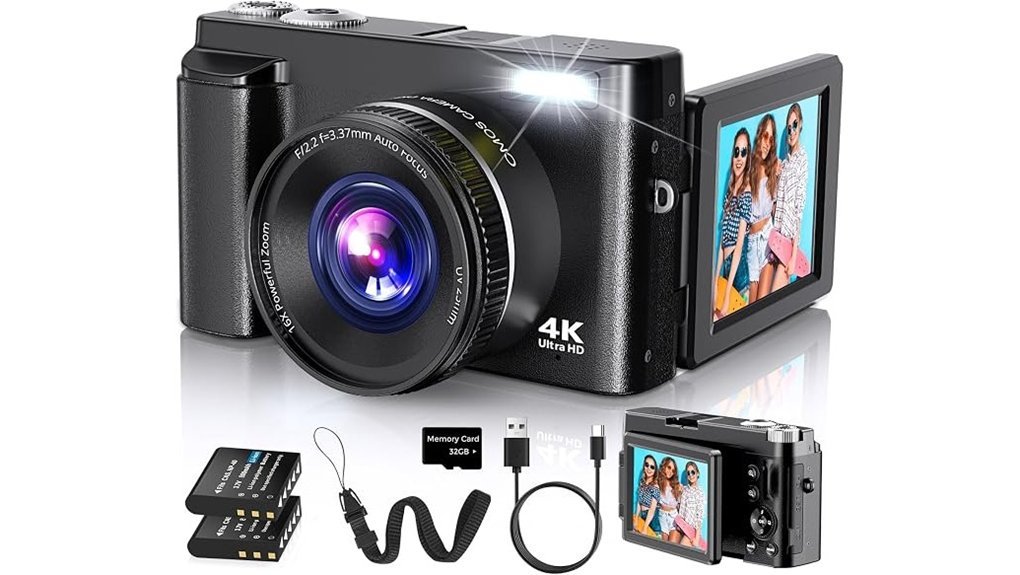
If you want a simple starter vlogging camera, I think the Duluvulu 4K 48MP makes a solid first pick. I’ve used cameras like this on walks and quick day trips. It feels light in your hand and slips into a bag without a fuss. That’s half the battle.
You get 4K video, 48MP photos, autofocus, and 16X digital zoom. The controls feel easy to learn. The shutter has that soft click that tells you it’s working. The 3.0 inch flip screen turns 180 degrees, so you can see yourself fast. For selfies and talking clips, it’s a real lifesaver.
I also like the extra shooting tools. You get anti shake, fill light, time lapse, slow motion, beauty face, filters, and exposure control. The camera can work as a webcam too, which helps for streaming or video calls. USB transfer keeps file moving simple. Two rechargeable batteries sweeten the pot.
If you’re a beginner or casual creator, this camera fits the job well. It’s easy to carry. It’s easy to use. And it covers the basics for YouTube videos, travel clips, and daily content without making your head spin.
Best For: Beginners, teens, and casual creators who want a portable vlogging camera with flip screen, webcam mode, and easy creative features.
Pros:
- Shoots 4K video and 48MP images with autofocus for clear everyday content.
- The 180 degree flip screen makes self recording and travel vlogging much easier.
- Includes useful tools like webcam mode, anti shake, fill light, and two batteries.
Cons:
- The 16X zoom works best for close range use since it uses digital magnification.
- The feature set suits entry level creators who want quick and simple controls.
- The fixed lens setup keeps the camera compact and easy for grab and go shooting.
Factors to Consider When Choosing a Camera for Content Creators
Pick a camera that fits your content style. I’ve shot with models that feel slick in hand and sound quiet on the move. 4K video suits most creators. *6K or 8K* helps if you crop hard or want extra detail.
Next, check the features that save a shoot. Image stabilization keeps handheld clips steady. Fast autofocus locks on your face like a bloodhound. Good audio inputs capture clean voice and cut that hollow room sound.
Then think about daily use. A light camera feels better after a long day and slips into a small bag with ease. Battery life matters on travel shoots and event days. Lens options give you room to grow from wide vlogs to crisp product shots.
Video Resolution Needs
Why video resolution matters
I’ve shot with cameras in bright sun and dusty trails. Resolution changes how your footage feels on screen. It’s the difference between soft detail and a clean sharp image. Think of it as the icing on the cake.
4K video gives you four times the detail of 1080p. You see finer textures. Skin looks cleaner. City lights pop. That extra detail helps your content look more polished on large screens and modern platforms. You also get more room to crop and reframe in editing.
Then there’s frame rate. I love 120fps for action clips. It plays back with smooth slow motion and adds a slick cinematic feel. You can almost hear the rush of the moment and feel the pace in your hands.
For photos, still resolution matters too. A sensor with 9.4 megapixels or more captures clearer detail and better texture. That helps when you post stills or pull frames from video.
File support counts as well. I always look for DNG and JPEG options.
- DNG gives you more editing control
- JPEG keeps sharing fast and easy
If you want quick honest advice, start here. Higher resolution gives you sharper video. Higher frame rates give you smoother motion. Together they help your content stand out.
Stabilization And Autofocus
I’ve shot with cameras that felt slick in the hand and others that rattled my wrists after ten minutes. Stabilization matters fast. If you film handheld or walk while recording, you’ll see the difference right away. A 3 axis gimbal smooths out jolts and sway. The footage looks steadier and feels easier on the eyes. *That’s worth its weight in gold.*
Advanced modes help even more. Active Mode cuts shake and soft blur during movement. You get cleaner handheld video with less fuss. For vlogging and travel clips, that polished look stands out.
Autofocus pulls equal weight. I want the camera to grab focus fast and hold it. You probably do too. Real time Eye Autofocus tracks eyes with impressive accuracy. Faces stay sharp as people move closer or turn away. ActiveTrack follows a subject for you. That frees you up to talk, demo gear, or catch the moment.
Here’s what I look for first:
- 3 axis stabilization for smoother handheld video
- Active Mode for walking shots and motion control
- Fast autofocus for sharp subjects
- Eye tracking for vlogs and talking head content
- Subject tracking for action shots and moving scenes
In real use, strong stabilization and autofocus make filming feel less like herding cats. You press record and move with confidence. The camera does more of the heavy lifting. Your footage looks sharper. Your video feels more professional.
Audio Recording Options
Audio Recording Options
I’ve learned this fast in the field. *Great video needs clean audio.* A crisp image means little if the sound feels thin or boxy. Audio is the other half of the story. It’s the glue that holds the cut together.
Start with the basics. Check the camera audio quality before you obsess over resolution. Listen for clear voices. Listen for room tone. Listen for small ambient sounds like footsteps or rustling fabric. Good stereo sound adds width and depth. It makes a scene feel alive instead of flat.
Next, check the built in microphones. Some do a solid job with dialogue. I’ve heard a few capture voices with a warm tone and less hiss. That soft air in a room matters. So does the touch of a shirt collar or the faint hum of a street. It all shapes the feel.
Still, external microphone support is where things really sing. That’s where you can plug in a shotgun mic for focused voice pickup or a lavalier mic for hands free recording. You get more control. You get cleaner results. It’s a night and day difference.
If you film interviews then a dual wireless microphone system helps a lot. Two speakers. One setup. Easy. I’ve used these in busy rooms where voices bounce like pinballs. Good wireless audio keeps each speaker clear and steady.
Also check the audio format specs. Formats like AAC at 48 kHz 16 bit make editing smoother in most video workflows.
Look for these key points:
- Stereo recording
- Built in mic quality
- External mic input
- Shotgun and lav mic support
- Dual wireless mic compatibility
- AAC, 48 kHz, 16 bit audio
My quick take. If you care about vlogging, interviews, or YouTube videos, put audio near the top of your list. Your viewers will hear the difference right away.
Portability And Battery
Portability and Battery
I’ve shot with plenty of cameras, and portability can make or break your day. A small camera feels light in your hand. It slides into your bag with ease. You stay ready for quick street shots, travel clips, and casual vlogs. *That’s worth its weight in gold.*
Weight matters on long days. Cameras under 200 grams feel easier to carry for hours. Your wrist stays fresher. Your grip feels steadier. The body also sits better in a jacket pocket or small sling bag. Less bulk. More freedom.
Battery life deserves the same attention. I want a camera that keeps rolling for around 160 minutes. That kind of stamina helps when you’re filming outdoors and hear the soft click of buttons all day. You spend more time shooting and less time hunting for a charger. *That’s music to my ears.*
Fast charging adds real convenience. A camera that reaches 80% in under 20 minutes gets you back in action fast. I’ve found that especially useful on travel days when every minute counts. The camera stays ready while you grab coffee or swap memory cards.
A few extras help too. These add-ons make your camera kit easier to carry and use:
- Small tripod, better for stable vlogging and quick setup
- Protective case, handy for travel and daily use
- Compact bag, easier on your shoulder during long walks
If you shoot on the move, pick a camera that feels light and lasts long. Good battery life** and a compact design** give you a smoother workflow. You’ll feel it in your hands and hear it in the quiet confidence of a kit that’s always ready.
Lens And Framing
Lens and Framing
Portability gets you out the door. The lens decides what your audience sees. I feel this fast in the field. You will too.
Lens choice shapes two big things. *Field of view.* *Depth of field.* Those sound technical. They’re simple in practice. One controls how much fits in the frame. The other controls how soft the background looks.
For vlogging, I reach for a wide angle lens first. You fit yourself in the shot. You fit the background too. You also capture more of the scene. That extra context makes travel videos, walk and talk clips, and group shots feel open and real. It’s like giving your viewer a window seat.
If you shoot more than one style, a zoom lens saves time. You reframe fast. You keep your pace. You skip the constant shuffle forward and back. I love that when the ground feels gritty underfoot and the street noise keeps building.
A screen or lens that tilts or rotates adds freedom. You grab high angles. You grab low angles. You check framing while filming solo. That matters when you’re juggling gear with one hand and coffee with the other.
Then there’s autofocus. This is where many cameras earn their keep. Good **eye tracking autofocus** keeps your face crisp. It holds focus as you move. It keeps your footage clean and usable. You hear the shutter click. You feel the focus snap in. That’s music to my ears.
What to look for
- Wide angle lens, for vlogging and travel
- Zoom range, for fast framing changes
- Tilting or rotating screen, for solo filming
- Eye tracking autofocus, for sharp video
- Shallow depth of field, for soft background blur
Pick the right lens and framing gets easier. Your video looks stronger right away.
Budget And Accessories
Budget and Accessories
A camera body can look cheap at first glance. I’ve learned the real bill shows up later. *The devil is in the details.*
You’ll want a few core extras:
- Lenses for sharp photos and clean background blur
- A tripod for steady shots and smoother video
- A microphone for clear audio that skips that hollow room sound
Pick up the gear and you feel the difference. A solid tripod feels firm in your hand. A good mic cuts the hiss and lets voices sound crisp.
Memory matters too. You’ll need fast SD cards with plenty of space. That matters most for 4K video, burst shooting, and high resolution photos. Slow cards drag you down.
Then comes editing. Most cameras pair best with photo editing software or video editing software. That’s part of your real camera budget.
I also check bundles with a sharp eye. Some camera kits include:
- Filters
- Lighting gear
- Support gear
- Extra batteries
- Memory cards
A smart bundle can save cash. Sometimes it’s a steal. Sometimes it’s lipstick on a pig.
Last point. Think about warranty coverage and customer support. Gear can fail after a long shoot or a dusty travel day. Good support brings peace of mind and saves you a headache later.
Bottom line: plan for the full camera setup cost, not just the body. You’ll buy smarter and shoot happier.
Conclusion
No matter where you are in your creator journey, I’ve found great cameras that fit your style, budget, and goals. Want crisp autofocus and clean 4K video, the Canon EOS R50 feels quick in the hand and sharp on screen. Prefer a tiny setup, the DJI Osmo Pocket 3 slips into your pocket like a secret weapon and the gimbal stays smooth as butter. Starting out, a simple beginner 4K camera gives you clear video and easy controls that click fast.
Pick the features you’ll use every week. Think flip screen, mic input, image stabilization, and battery life.
Here’s the plain truth. The right camera helps you start fast and keep filming. Trust your gut. Press record. Your best content is out there and it’s ready for you.